Statuses get lost
“What's happening with my car?” — and the manager runs to the workshop to ask. Customers call because they can't see the process.
First month free · no card required
Vector CRM is the operating system for repair shops, tuning studios and detailing centres: from the moment a car arrives to payment and service history. Transparent for customers. Effortless for the team. Under the owner's control.
30 days free · no card required · cancel any time
For repair shops · tuning studios · detailing
Sound familiar?
Most CRMs for repair shops keep records. Vector CRM also runs the repair process itself — and makes it transparent for everyone involved.
“What's happening with my car?” — and the manager runs to the workshop to ask. Customers call because they can't see the process.
Line items without explanations breed mistrust, disputes and lost customers.
Paper, spreadsheets and a mechanic's memory. A year later nobody can say what was done to the car, or why.
How it works
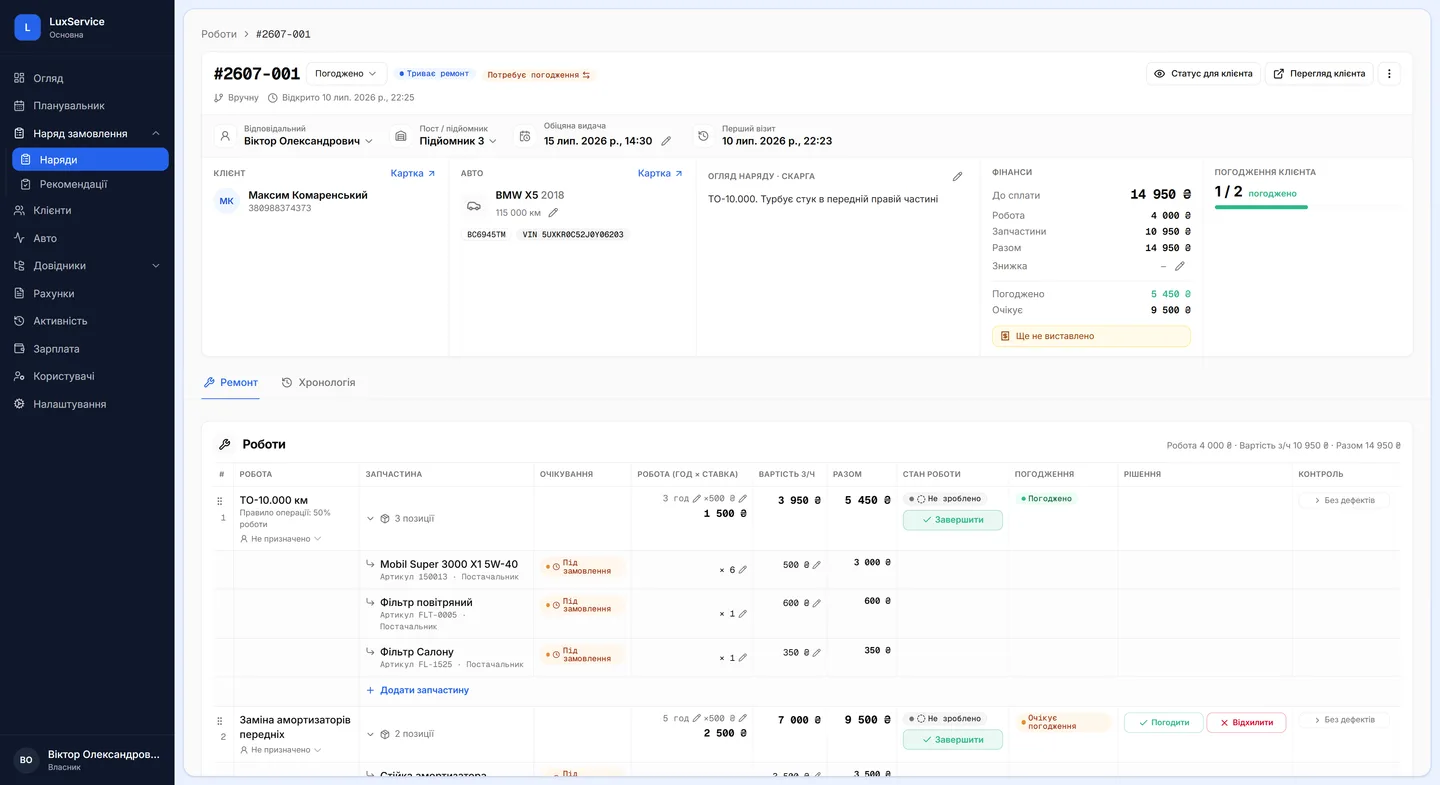
Your team does the work. Vector updates statuses, keeps the timeline and keeps the customer informed.
Customer and car are in the system in a minute. VIN lookup prefills the data.
Diagnostics, inspection, repair or custom work — one structure covers it all.
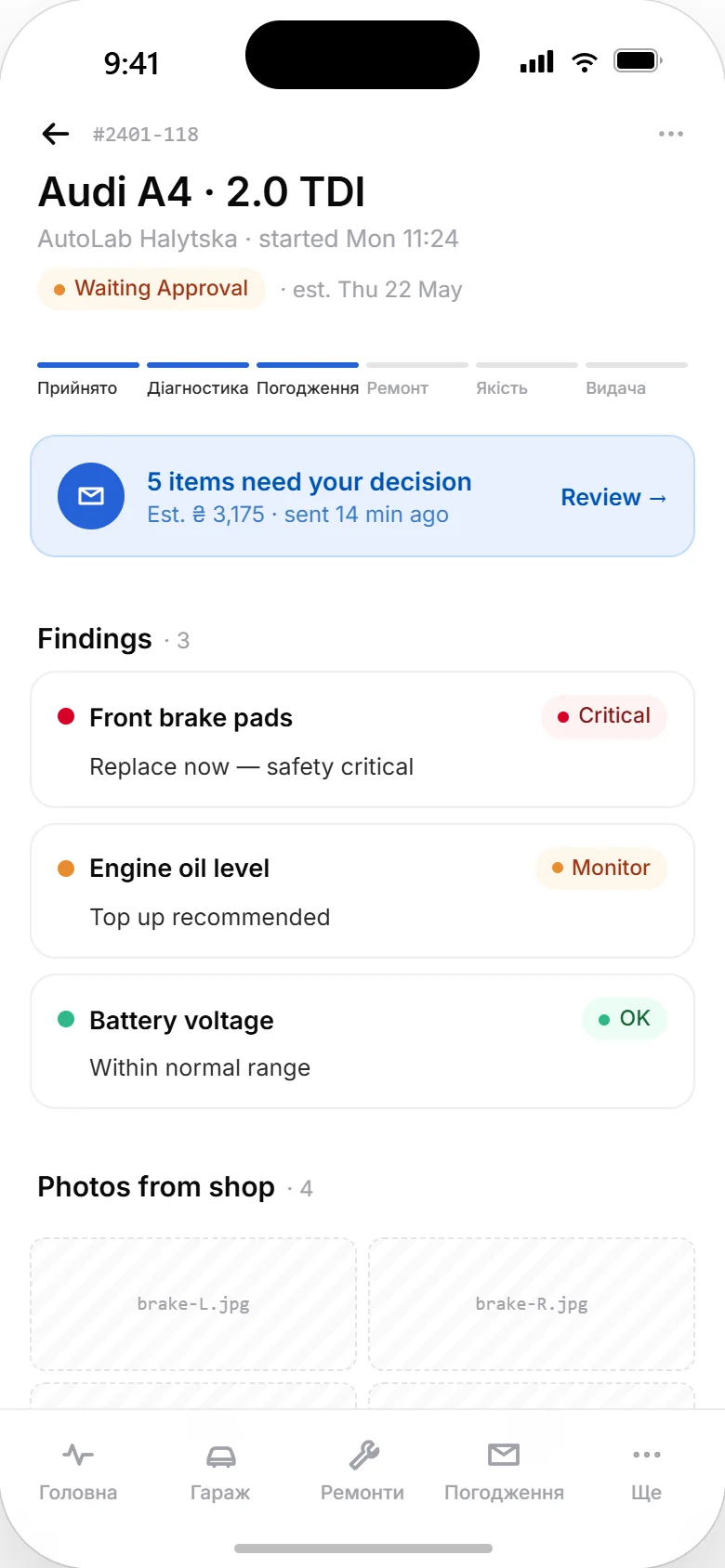
Checklists with photos. Every item rated: OK, monitor, recommended, critical.
VIN-based TecDoc search, warehouse reservation, labour lines into the estimate.
The customer approves each line — in the app, by phone or in person. Everything is recorded.
Mechanics see their tasks, mark them done, attach photos. Statuses update automatically.
The invoice is built from approved lines. Pay online via LiqPay or WayForPay — or at the desk.
Every repair stays in the vehicle's history — with photos, explanations and prices.
Everything in one system
Seven modules that cover a shop's daily work and replace the notebook, the spreadsheet and half the phone calls — without ERP-grade complexity.
A work order → work group → line structure that fits repair, tuning and detailing.
Checklist templates, four condition statuses, wear percentage, photo evidence.
Line-level customer approvals. Every decision recorded with source, time and author.
VIN-based TecDoc search and a simple warehouse tied to work orders.
Estimates, discounts, partial payments. Online via LiqPay and WayForPay.
Balances across cash desks and bank accounts, income and expenses per period, customer receivables and supplier debts.
Every visit, defect and photo stays on the vehicle record — even if the car was serviced at another Vector shop.
How the shop software worksWhat Vector CRM costs — from $99 per location
The customer app
The Vector mobile app shows car owners what's happening, why it's needed and what it costs.
The car owner app is free to download:
Integrations
Switching
You don't have to start from an empty base. We migrate customers, vehicles, services, stock levels and service history from your current CRM — or straight from Excel sheets and CSV exports.
We work with exports from 1C and other shop-management systems. We agree the format up front and adapt to whatever your system can export.
No system at all? Send the spreadsheets — even raw ones, with inconsistent column names across several sheets. We map them onto Vector's structure.
We load the migrated data into your account and show it to you first. Go-live happens only once you've confirmed everything is there.
Questions & answers
Repair shops, tuning studios and detailing centres. The work-order model is the same for diagnostics, scheduled servicing and repair, and the “custom work” type exists precisely for non-standard projects that don't fit a service catalogue.
Three things. The customer approves each line separately rather than the whole order in one tap. Defects are logged with photos and a wear level, so a recommendation reads as evidence rather than an attempt to pad the job. And the customer has their own app showing the repair as it happens — most shop systems stop at an SMS.
Initial configuration takes 10–20 minutes, depending on how many locations you run and how much data you have. Most of it is set once. Migrating data from your old system is on us, and we only go live once you have confirmed nothing is missing.
Your company details, a good-quality logo, bank details, the shop's address and contacts, your opening hours and your labour-hour rate. If you plan to take online payments, your LiqPay connection details as well.
Everyone sees only what their role allows, so nobody has to learn everything. Mechanics get their own mode with a list of their jobs — start, finish, attach a photo; the service advisor works with the scheduler and the orders. Roles can be shaped to match how your shop is actually organised.
Signing up takes a minute. The first month is free, with every feature and no card. If you would rather see the system on your own workflows first, book a demo.
Start free30 days free, no card required
We'd like to use Google Analytics to understand how visitors use this site. Analytics runs only with your consent. Details — in the Privacy Policy