Finances
Cash desks, finances and mechanic payroll
Not accounting — management reporting an owner can actually read. What's in the cash desk and the bank accounts, what came in and went out this month, who owes you and whom you owe. Plus payroll you don't have to work out in a spreadsheet.
Finances
Cash desks, accounts & reconciliation
Every hryvnia the shop holds, on one screen and in real time: what's in the cash desk and the bank accounts, what came in and went out this month, who owes you and whom you owe. Not accounting — management reporting an owner can actually read.
- Total balance plus the standing balance of every cash desk and bank account
- Income, expenses and net cash flow per period, with expense categories
- Customer receivables and supplier debts — overdue items surface on their own
- Transfers between accounts, cash reconciliation, refunds, adjustments and an audit trail
- Payroll accrues automatically from completed work, on each employee's own model
- Online customer payments, and CSV export for any period
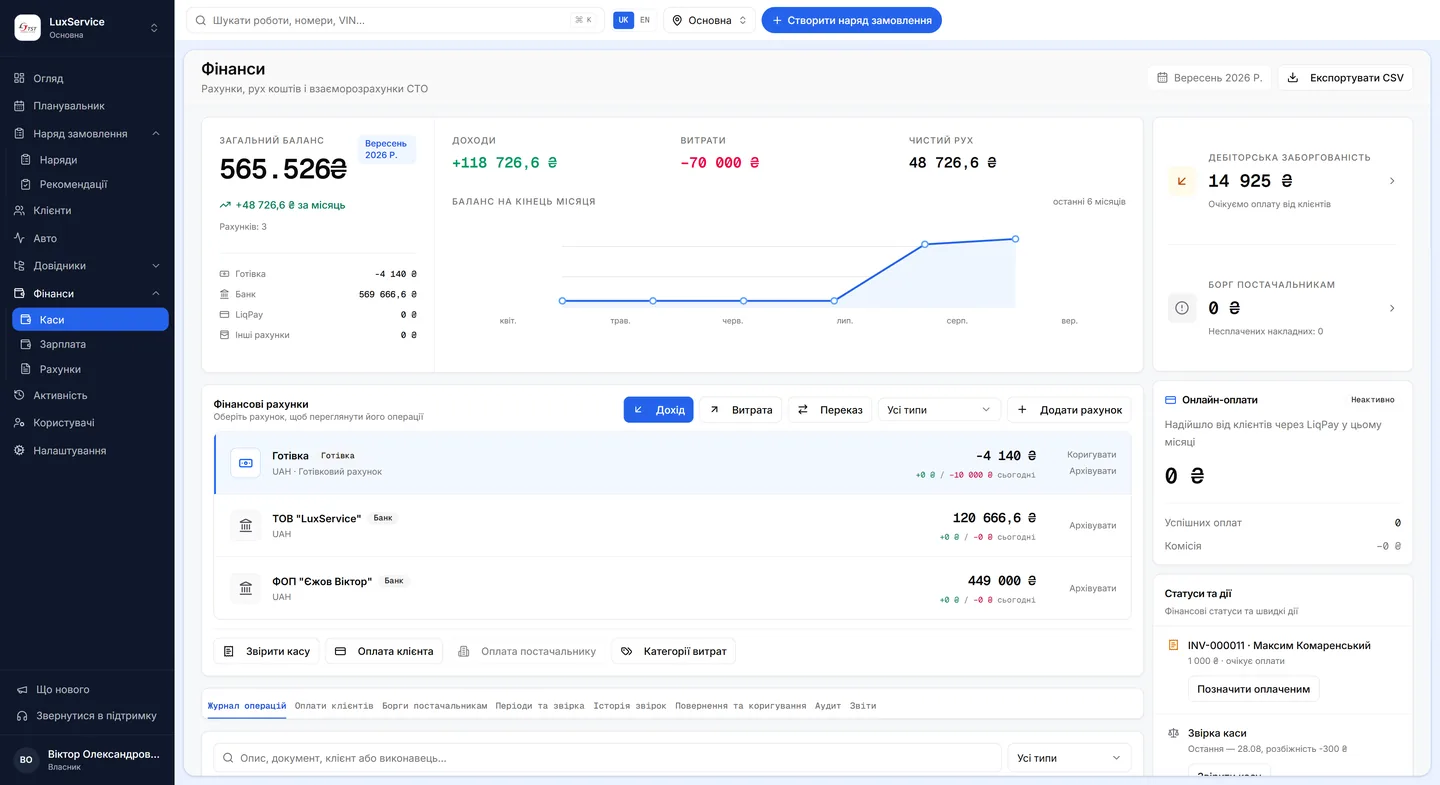
The shop's money on one screen
A total balance plus the standing balance of every cash desk and bank account; income, expenses and net cash flow for the period, with expense categories. Transfers between accounts, cash reconciliation, refunds and adjustments — all audited, so every figure has a provenance.
Customer receivables and supplier debts are shown separately, and overdue items surface on their own. This is the part usually kept worst in spreadsheets, because it needs daily attention — and a spreadsheet never asks for any.
Payroll accrues from completed work
Pay accrues automatically from the jobs a mechanic completed, on that specific employee's own model — an hourly rate or a percentage. The tariff sets the labour-hour rate and the reward percentage, and an individual location can carry its own labour-hour rate.
At the moment a job is completed, the system stores an immutable snapshot: the payment method, the rate or percentage, the number of labour hours and the amount earned. That snapshot is what payroll is built from.
Changing a rate never rewrites the past
If an administrator changes a mechanic's rate, their payment rule or the labour hours in the catalogue, previously completed work is untouched — the new rules apply only to new work. A mid-month raise therefore doesn't retroactively recalculate what's already done.
It's a detail right up until the first argument about pay. After that it's clear why the snapshot has to be immutable: “what was I credited for that job in March” has exactly one answer, and it doesn't depend on what changed since.
February — completed work
- Clutch replacement180 / labour hr
- 60k service180 / labour hr
March — completed work
- Timing belt220 / labour hr
- Diagnostics220 / labour hr
February's accruals keep the old rate for good.
Questions & answers
Frequently asked questions
Can I see consolidated finances across all locations?
No. One location is active at a time, and the financial figures belong to it. The owner switches between locations in one click, but the system doesn't produce a network-wide consolidated figure.
Does this replace accounting?
No, and it doesn't try to. This is management reporting: how much money there is, where it came from, where it went and who owes whom. Tax and statutory reporting stay with your accountant.
Can the data be exported?
Yes — any period exports to CSV, for your accountant, your bank or your own spreadsheet workings.
Where the amounts come from: invoicesHow a mechanic closes a jobVector pricing