For the workshop
The mechanic's workspace: only their own work
A mechanic shouldn't have to learn a CRM. They need to see what to do next, open the car's specs, log the wear, attach a photo and close the job. Everything else is none of their concern, and isn't shown.
For the workshop
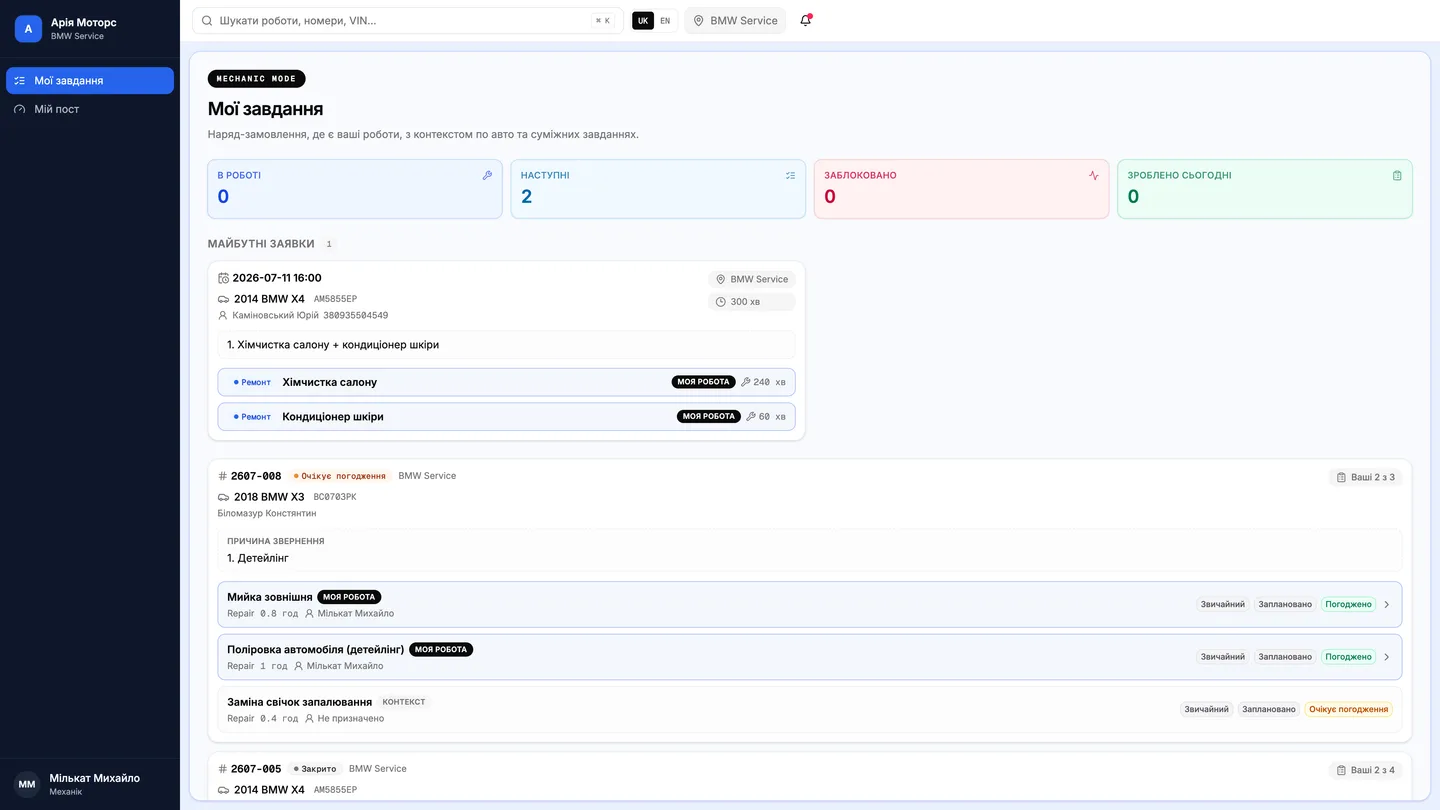
Mechanic's “My Tasks”
Mechanics see only their own work: start, complete, fill the checklist, attach photos. Works on tablets and phones, autosaves every entry.
- Zero bureaucracy — an action-based interface
- Used parts are deducted from stock automatically
- Managers see progress without asking around
Exactly as much as is needed
Every user sees only the sections and functions their role allows. The system ships with a shop administrator, a manager, a service advisor, a storekeeper and a mechanic, and the administrator can create further roles to match the actual org chart.
In mechanic mode the screen is a list of assigned jobs. Opening one shows the car's specifications — VIN, engine, transmission, body type, fuel — along with the reason for the visit and the mechanic's own previous work on that car.
- Shop administratorThe whole system
- ManagerOrders, customers, scheduler
- Service advisorScheduler and orders
- StorekeeperStock, parts, levels
- MechanicTheir own jobs
Roles are shaped to match a particular shop.
The job lifecycle, and quality control
A job moves through four states: created, scheduled, in progress, done. The mechanic drives it themselves — the order's status follows what is actually happening on the floor, rather than what a manager remembered to click.
Once finished, a job can go to quality control. The checker reviews the result and either confirms it or hands the job back. It's a real step, not a formality at the end of the order.
Photos and wear, from where the car is
Defects are logged where they're visible: the mechanic sets the wear level, adds a description and a recommendation, and takes photos from a tablet or phone. Nothing has to be re-entered at a desk afterwards — so nothing goes missing by the end of the shift.
Parts used are deducted from stock at the moment of use. The manager sees progress on the order without walking out to ask “how's it going?” — and the mechanic isn't interrupted to answer.
Questions & answers
Frequently asked questions
Does a mechanic need a separate app?
The mechanic's workspace is a dedicated mode of the system, built for tablets and phones. Mechanics sign in with the same account and land straight in their own job list.
Can a mechanic see other people's orders?
Visibility follows the role. In mechanic mode the screen shows the jobs assigned to them; access to anything else depends on the permissions the shop administrator has configured.
Can two mechanics work on the same car?
Yes. Assignees are set per job, so one order can be worked by several mechanics at once — each seeing only their own part of it.
How the work order worksPhoto-backed defect loggingHow mechanic payroll is calculated