The core
The work order: everything about one visit, in one document
The work order is the shop's main workspace. Intake, diagnostics, labour, parts, defects, approvals, the repair itself, quality control and the invoice all live in one document — not in seven tabs and three chat threads.
The core
Work orders
Every visit is one work order structured as work groups → line items. Diagnostics, inspection, repair and custom work for tuning or detailing — one model covers all of it.
- Labour, parts, photos and approvals — all in the order's context
- Statuses update from the team's actions, not by hand
- An internal status for the workshop, a clean status for the customer
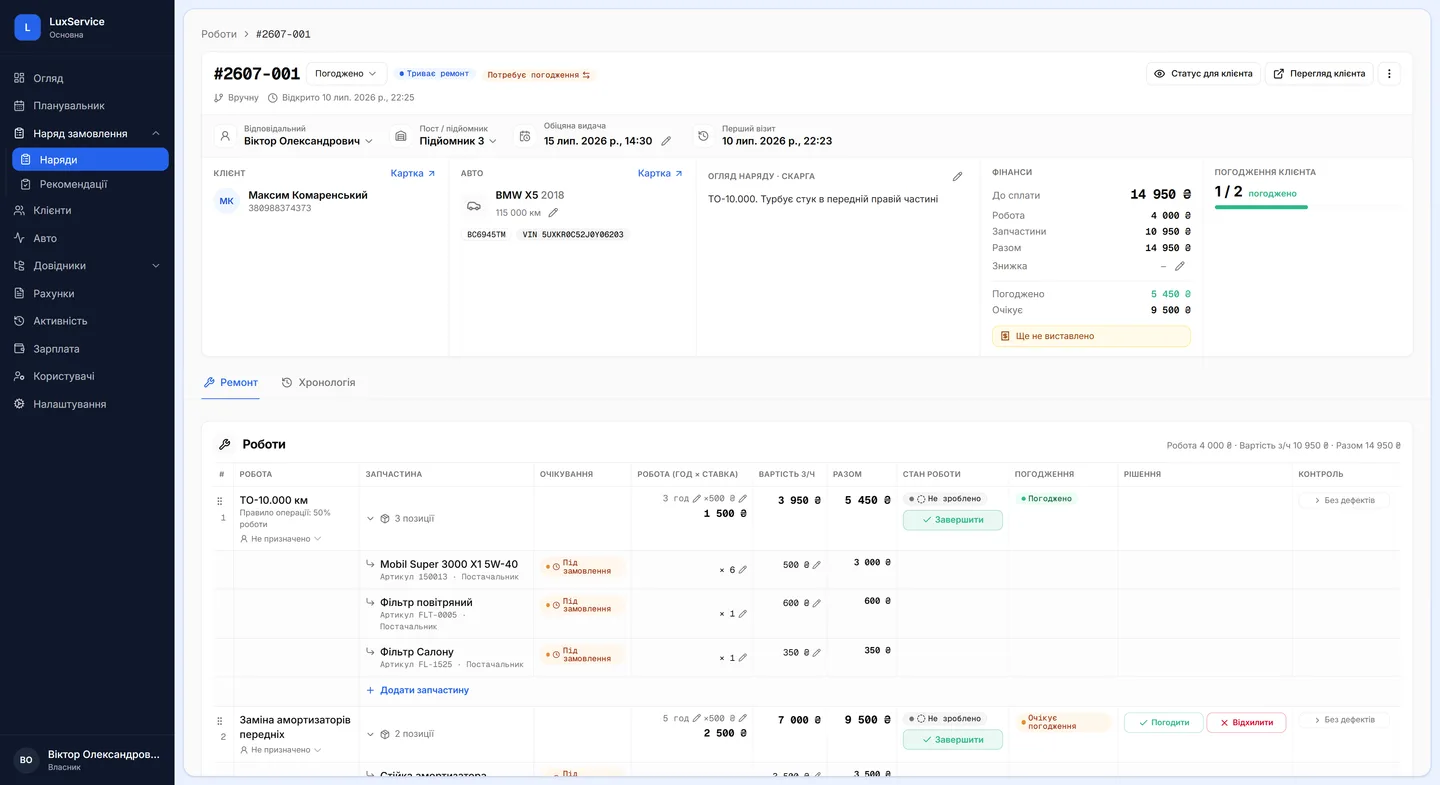
One visit, one order
Every line on an order is a job, a stock item or a custom entry. Jobs come from the service catalogue, which carries the standard time, the price and the category along with the name — so two service advisors can't name the same operation differently, or price it differently.
Parts, consumables and fluids attach to a specific job. As you add them the system checks stock, reservations and the warehouse — not at the end of the shift, when it turns out the pads were never there.
You can find an order by its number, the customer, a phone number, the car or the VIN. The list filters by state — active, awaiting approval, awaiting parts, ready for collection, unpaid, closed — and switches between a list and a kanban board.
Eleven statuses, moved by the work itself
An order moves through Request, Arrived, Awaiting approval, Approved, Awaiting parts, On hold, In progress, Quality control, Ready for collection, Closed and Cancelled. Each status governs which actions are available — so a status means something specific, rather than being a label for “we're on it”.
A separate customer-facing status runs alongside it. Inside the workshop you call things what they are; the customer sees a phrasing that makes sense to them. These are two independent fields, not one field wearing two faces: change the internal status and the customer one follows, but you can always override it by hand.
- Request
- Arrived
- Awaiting approval
- Approved
- Awaiting parts
- In progress
- Quality control
- Ready for collection
- Closed
Each status governs which actions are available next.
Several mechanics on one order
An assignee is set per job, not per order. One car can be having its suspension done by one mechanic and its electrics by another at the same time, with each seeing only their own part of it.
A job has its own lifecycle: created, scheduled, in progress, done. Once finished it can go to quality control, where a checker either confirms the result or hands the job back. And when a job is scheduled to a date and time, it appears in the Scheduler on its own.
Everything is logged: creation, status changes, added jobs, approvals, edits, price changes, issued invoices, closure. “Who removed that line, and when” is a question the order itself answers.
- In progress
- Scheduled
- Done
- Quality control
An assignee is set per job, not per order.
Questions & answers
Frequently asked questions
Can I create an order without a booking first?
Yes. An order can be created from a booking in the Scheduler, manually, or on the spot when the customer arrives — all three are first-class paths. Once created it gets a unique number.
What exactly does the customer see?
The customer-facing status, plus the jobs, items and defects marked as visible to them. Internal notes and workshop comments stay in the workshop.
Can one order produce several invoices?
Yes. An order can produce one or several invoices — diagnostics billed separately from the repair, for instance. The order shows each invoice number and its payment state.
How customers approve each linePhoto-backed defect loggingWhat Vector costs